
CKPool Solo Mining Guide: solo.ckpool.org Setup, Fee and Stats
Short answer: CKPool, usually reached at solo.ckpool.org, is a long-running solo mining service built on ckpool, the open-source pool software by Con Kolivas. You point your miner at stratum.ckpool.org port 3333, use your own Bitcoin address as the username and any password. Nothing is paid unless your own miner solves a block; if it does, the reward goes to your address minus a 2% fee. For a home miner that is a long shot, so treat it as a hobby rather than an income plan.
This ckpool solo mining guide covers one service in detail: how CKPool works, the exact connection settings it publishes, how to set it up on common hardware and how to read its statistics. For the general picture, start with how mining pools and shares work and our guide to solo Bitcoin mining and lottery miners. All pool details below come from the pool’s own page and source repository, checked on October 4, 2026; pool settings can change, so confirm them on solo.ckpool.org before you mine. Bitminers does not guarantee mining profitability.
What CKPool and solo.ckpool.org are
“CKPool” (also written “ck pool”) refers to two related things:
- ckpool, the software. The ckpool source repository describes it as a low-overhead, multi-process, multi-threaded bitcoin mining pool, proxy, passthrough and library written in C for Linux, by Con Kolivas. It is released under the GNU GPL version 3, so anyone can read, run or modify it.
- solo.ckpool.org, the public service. This instance runs ckpool in solo mode. Its page calls it anonymous and not-for-profit, says it has been mining solo blocks since 2014, and notes that it is “NOT a pool despite its name”: it exists because you cannot mine directly to a Bitcoin Core node, so it provides the stratum server that a miner needs.
No registration is required. The page states there are no payment schemes and no pool operator wallets, and that the fee supports maintaining the service and developing ckpool further.
How solo payouts work on CKPool
A regular pool turns your shares into small, regular payments using one of the schemes compared in FPPS vs PPS vs PPLNS. CKPool does none of that. Your miner works on block templates built by the pool, and:
- If one of your hashes meets the full network difficulty, that block pays your Bitcoin address, minus the 2% fee. The page describes the fee as coming on top of the transaction fees paid by Bitcoin, meaning a small portion of the reward goes to maintaining the pool.
- If your miner never solves a block, you receive nothing. There is no balance, no minimum payout and no partial credit.
- Shares are tracked, but the FAQ calls them “cosmetic for feedback only”: they show your miner is working, not that you are owed anything.
The pool also says it does not filter transactions and uses default Bitcoin Core transaction selection, publishing its current transaction list at solo.ckpool.org/pool.txns.
CKPool connection settings
These are the values the pool publishes. Enter them exactly; a single wrong character in the address means the work is not credited to you.
| Setting | Value published by the pool |
|---|---|
| Main stratum (V1) | stratum+tcp://stratum.ckpool.org:3333 |
| Username | Your Bitcoin address, with any worker extension or none (for example youraddress.bitaxe) |
| Password | Anything; it is ignored (x is the usual placeholder) |
| High-difficulty port | stratum.ckpool.org:4334, for mining rentals only |
| Stratum V2 | stratum.ckpool.org:3336, with the authority key shown on the pool page |
The main endpoint has servers in the USA, EU, Asia and Oceania; the pool says it automatically picks the lowest-latency connection and fails over if one goes down. You can also choose a server by hand: US west (uwsolo.ckpool.org), US east (uesolo.ckpool.org), Germany (eusolo.ckpool.org), Singapore (sgsolo.ckpool.org) or Australia (ausolo.ckpool.org). The page warns that a manually chosen server will not fail over. Stratum V2 needs a compatible miner or an SV2 proxy.
Setting up CKPool on a Bitaxe or NerdQaxe
Open the device’s AxeOS dashboard from a browser on your network (first-time Wi-Fi setup is covered in our Bitaxe solo mining guide) and go to the pool settings:
- Stratum Host: stratum.ckpool.org (AxeOS takes the host name alone, without stratum+tcp://).
- Stratum Port: 3333.
- User: your Bitcoin address, optionally followed by a dot and a worker name.
- Password: x.
- Save and restart, then check that accepted shares start climbing on the dashboard.
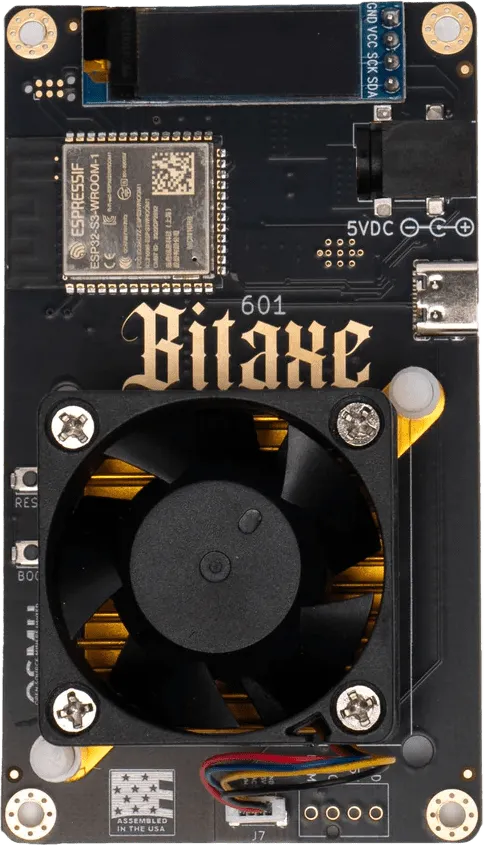
One detail matters here. The Bitaxe firmware’s published configuration for the Gamma 601 board ships with a factory Bitcoin address already in the username fields, with public-pool.io as the primary pool and solo.ckpool.org as the fallback. AxeOS shows a warning while the default factory address is still in place. Replace it in both the primary and fallback slots, or any block found would pay someone else.
The NerdQaxe++ is set up over Wi-Fi from a browser in the same way: same host, port, username and password values.
Setting up on an Antminer, Whatsminer or Avalon
On an Antminer, open the miner’s IP address, log in and go to Miner Configuration. Enter stratum+tcp://stratum.ckpool.org:3333 as the URL, your address (plus an optional .workername) as the worker, and x as the password. Whatsminer units take the same three values in their pool settings. Canaan’s Avalon home units are configured in the Avalon Family app, where you enter the pool details.
Any SHA-256 machine can connect. CKPool’s own guidance is that hashrates below 100 GH/s are not recommended for Bitcoin because it is unrealistic that they will ever find a block. Every home miner we sell is above that line, but the odds still scale with hashrate:
| Home miner | Hashrate | Price* |
|---|---|---|
| Bitaxe Gamma 601 | 1.2 TH/s at 17 W | $77.17 |
| NerdQaxe++ | 4.8 TH/s at 76 W | $279.00 |
| Canaan Avalon Nano 3S | 6 TH/s at 140 W | $216.11 |
| Canaan Avalon Q | 90 TH/s at 1,674 W | $1,291.64 |
*Bitminers prices at the time of writing (October 4, 2026); check each product page for the current price. The full range, including the Avalon Nano 3 and Mini 3, is in our home and solo miners category.
Reading the CKPool stats pages
CKPool has no login, so statistics are looked up by address:
- Your stats: raw.stats.ckpool.org/users/ followed by your Bitcoin address. It returns plain JSON with hashrate1m, hashrate5m, hashrate1hr, hashrate1d and hashrate7d (averages over each window), lastshare (a Unix timestamp), workers, shares, bestshare and bestever, plus the same figures per worker.
- Pool totals: raw.stats.ckpool.org/pool lists users, workers, pool hashrate and share counts. Graphs are at stats.ckpool.org.
- Blocks found: the pool links to its block list on mempool.space under the pool name “solock”.
The figure people watch most is bestshare: the highest difficulty any of your shares has reached. A block needs a share at or above the full network difficulty, so bestshare shows how close your luckiest hash came. It is not progress toward a block; each hash is an independent try, and luck does not build up.
If your address shows nothing, the FAQ explains why: the pool sets a minimum share difficulty of 10,000, so very low hashrate devices take a while to register while it adjusts. Miners with a client-diff option can lower it, but that has no influence on the chance of finding a block.
Risks and common mistakes
- Variance. Solo mining is all or nothing. To put numbers on your own setup, use our solo mining calculator with the current network hashrate. For any home-sized miner, the chance of a block in a given year is small.
- Address typos. The pool rejects an invalid address, but it cannot tell whether a valid address is yours. Copy the address from your own wallet and check the first and last characters.
- Copying the example. The address in the example settings on solo.ckpool.org is the same one listed next to Con Kolivas in the ckpool AUTHORS file. Do not paste it into your miner.
- No support promises. The service says all care is given but no responsibility is taken if something goes wrong with the pool.
- The fee. If you already run your own well-connected Bitcoin node and solo stratum server, the pool itself says there is no advantage to using it beyond convenience, and you would only pay the fee.
Bitminers does not guarantee mining profitability.
Frequently asked questions
How much does solo CKPool charge?
The pool states a 2% fee, taken from a block your miner finds. If your miner never finds a block, there is nothing to take a fee from, and there are no sign-up or withdrawal charges because there are no accounts.
What is the CKPool stratum address and port?
stratum+tcp://stratum.ckpool.org:3333 for standard mining. Port 4334 is for mining rentals only, and Stratum V2 uses port 3336 with the key shown on the pool page.
Do I need an account to mine on CKPool?
No. Your Bitcoin address is the username, any password works, and your statistics are found by entering that address on the stats page.
Why don’t my miner’s stats show up on CKPool?
Usually because the hashrate is low and the pool’s 10,000 minimum share difficulty means shares arrive slowly at first. Wait for the pool to adjust, confirm the address in your miner matches the one you are looking up, and check that the miner reports accepted shares.
Can a Bitaxe find a block on CKPool?
It is possible, because every hash has the same chance, but the probability for a 1.2 TH/s device is very small. Run it as a learning project with a tiny lottery element, not as an income source.